Context menu
Right-click a contact to open a context menu.
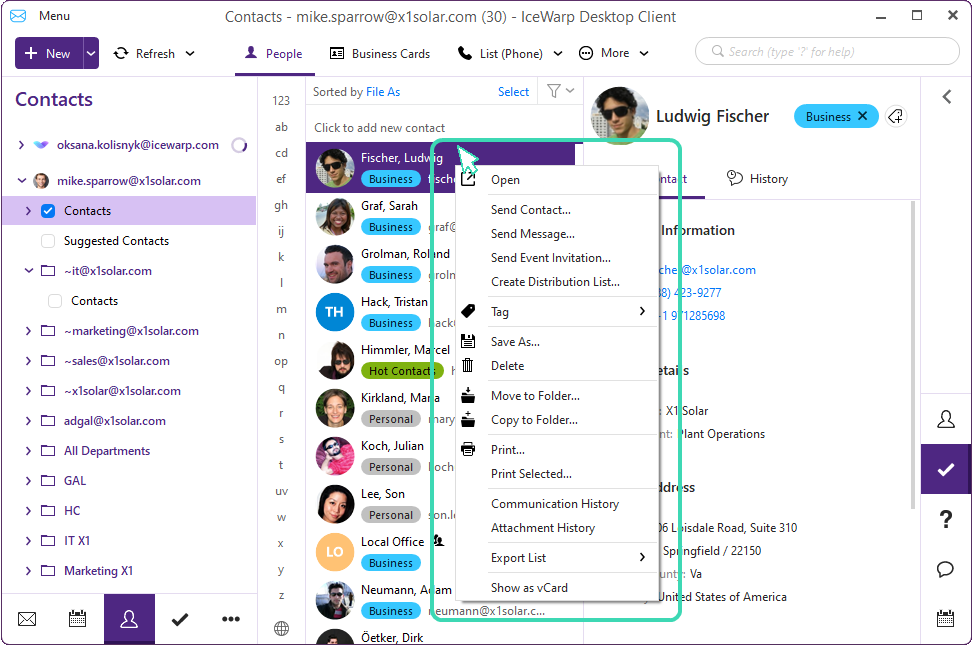
Figure. Context menu.
In the context menu, there are the following options:
- Open: Opens contact details
-
Send Contact: Quick attaches contact to a new Email
-
Send Message: Opens a new Email window with selected contact as addressee.
-
Create Distribution List: Useful when bulk-selecting contacts
-
Tag: Adds a color category
-
Save As: Save record locally as VCAR file
-
Delete: Removes record from contact lists
-
Move to Folder: Relocates contact to another folder
-
Copy to Folder: Creates a duplicate entry in another folder
-
Print: printout of the whole address book
-
Print Selected: printout of selected contacts
-
Communication History: Compiles all commonly shared communications
-
Attachment history: Compiles all commonly shared files
-
Export List: Exports to CSV or HTML
-
Show as vCard: Displays the vCard record in a pop-up window

